GetHossa

The portfolio tracker for self-directed investors

Are you beating the S&P 500? Know for sure.

Import your Interactive Brokers history or add trades by hand, and see what your portfolio really earns — with dividends, a time-weighted return, and the index you could have simply bought right next to it.

  • No brokerage login needed
  • Results in US dollars
  • US and international stocks

Import your history from

Prices from NYSE, Nasdaq and major European exchanges

  • Revolut
  • XTB
  • InteractiveBrokers

+ many other brokerages (Schwab, Fidelity, Robinhood, Vanguard…) — add trades by hand in seconds

What you get

Everything your brokerage doesn't show you

Brokerage apps show positions. GetHossa answers the question you actually have: are your decisions paying off?

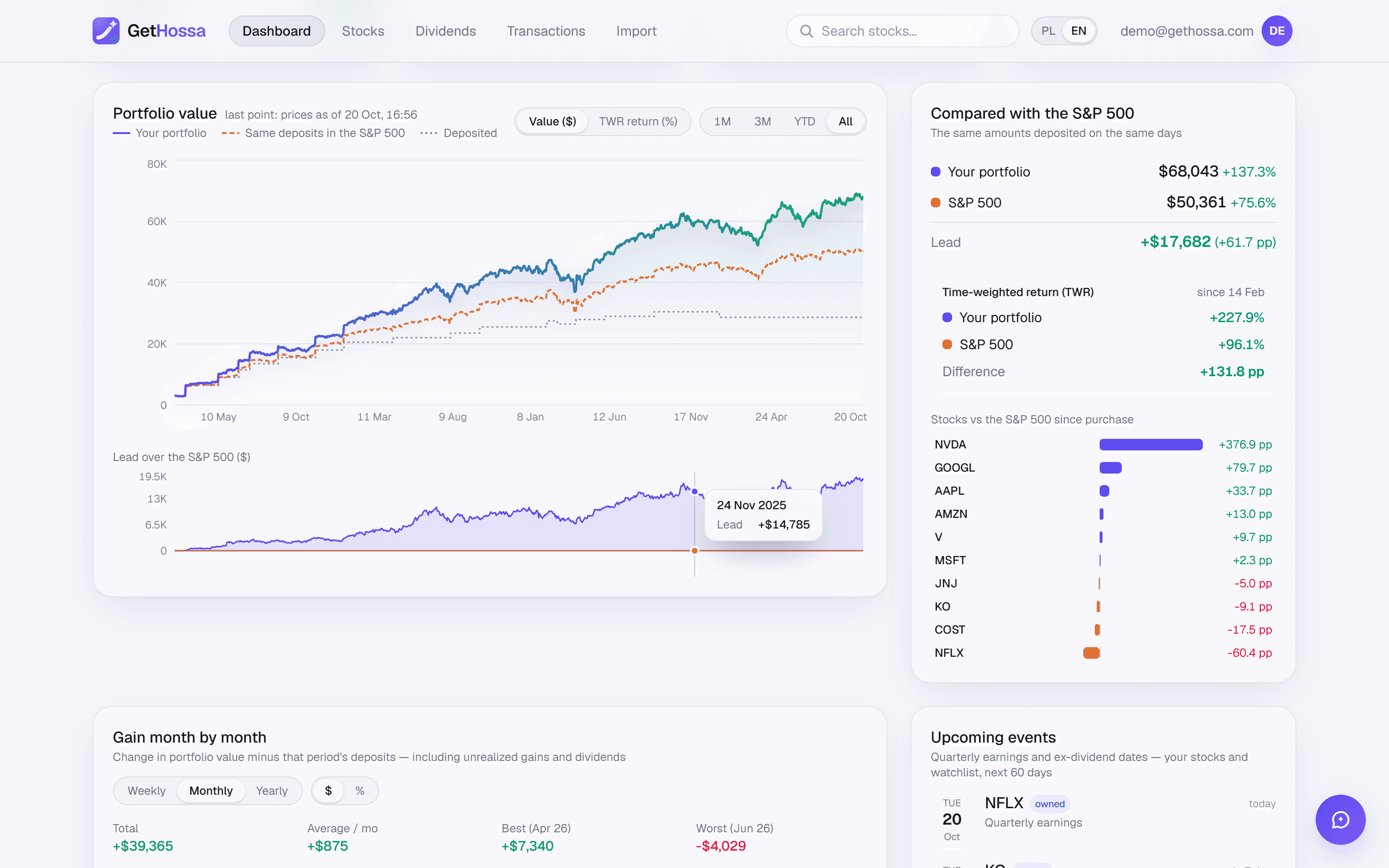
GetHossa dashboard for a demo portfolio in US dollars: a portfolio value chart with a dashed line for the same contributions in the S&P 500, and a side panel with total return, time-weighted return and each holding's lead over the index.

Benchmark

S&P 500 comparison

The same dollars, on the same days, in the S&P 500 — and a time-weighted return to compare fairly.

  • Same dollars, same days. Every purchase also “buys” SPY at that day's close; every sale “sells” the same dollar amount. No guesswork about start dates.
  • Dividends on both sides. The index uses SPY's adjusted close, so reinvested dividends count. Your own dividends count too.
  • Every holding against the index. A bar for each stock shows how many percentage points it is ahead of or behind the S&P 500 since you bought it.
See how it works
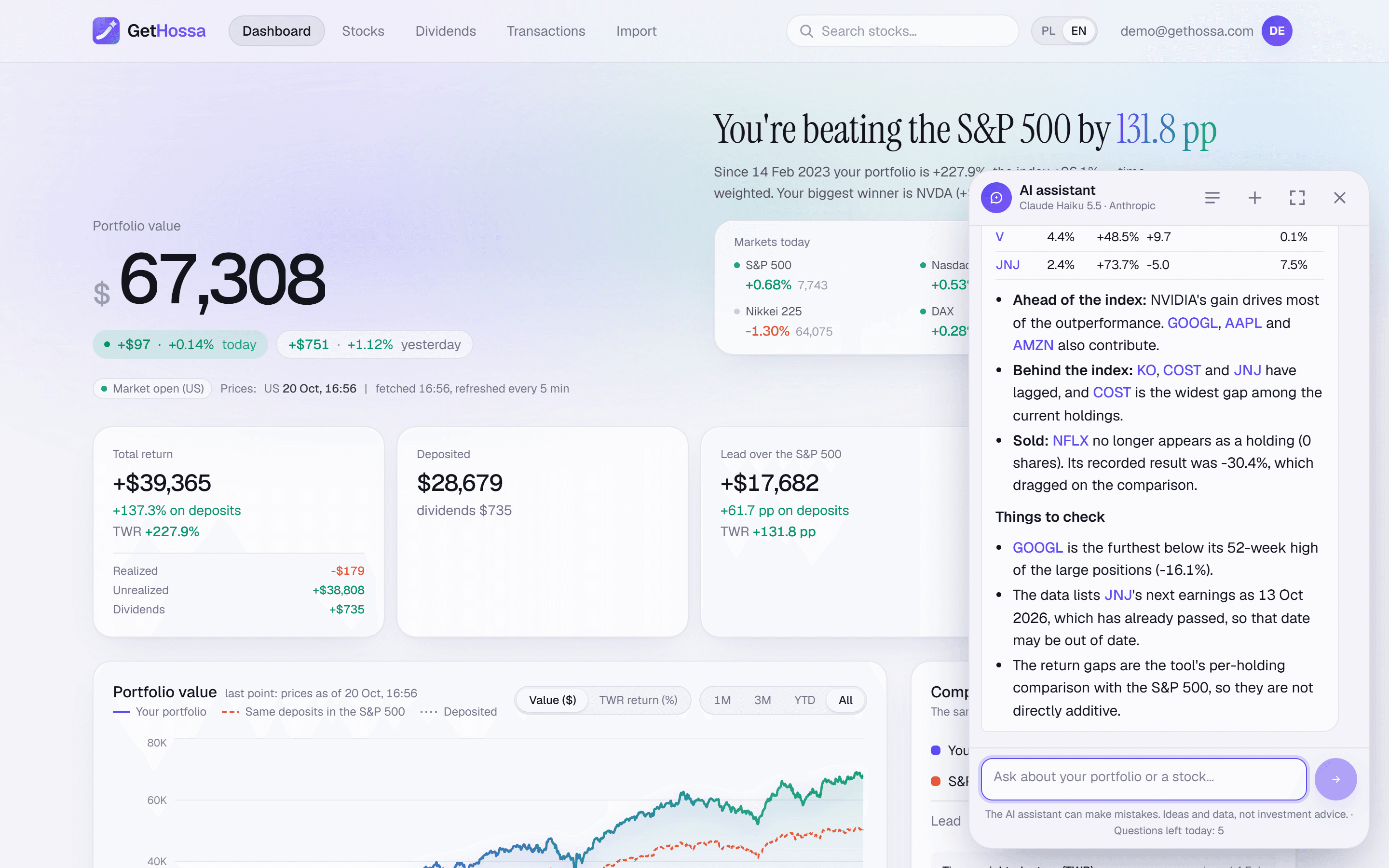
The GetHossa AI assistant chat panel open over the portfolio dashboard, answering a question about which holdings are furthest below their 52-week highs with a short list of tickers, P/E figures and a note that it isn't a recommendation.

AI assistant

AI assistant

Ask about your holdings, a company's valuation or the latest news — answers built on your own data.

  • Uses your real numbers. It looks up your holdings, weights, results and S&P 500 comparison before answering a question about your portfolio.
  • Knows the page you're on. Open it on Apple's company page and “this company” means Apple. One click on “AI summary” starts a briefing.
  • Ideas, not orders. It lays out arguments and risks and suggests companies worth researching. It won't tell you to buy or sell.
See how it works
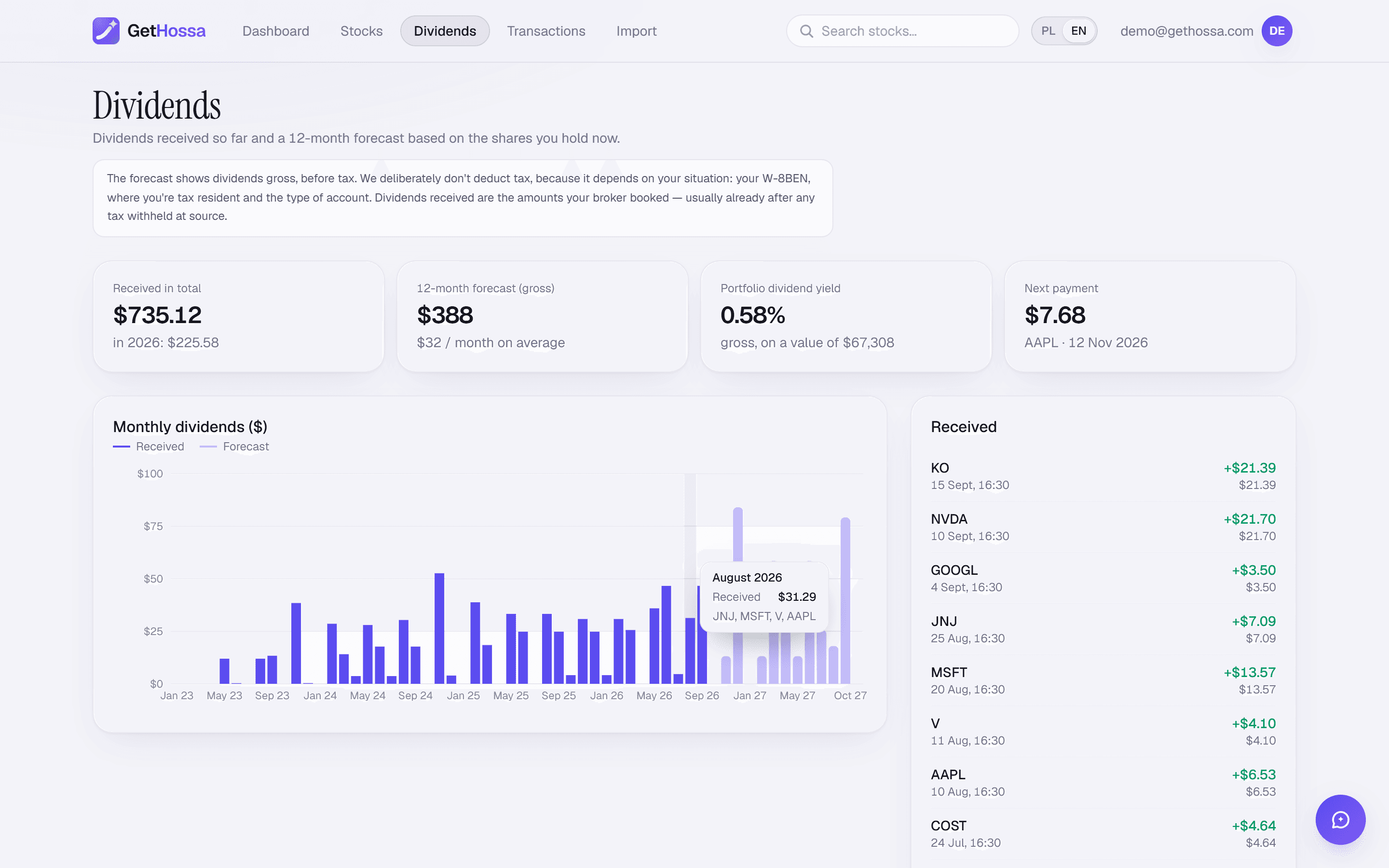
GetHossa dividends page for a demo portfolio: summary tiles for dividends received, the 12-month forecast, portfolio yield and the next payout, a monthly bar chart of received and forecast dividends, and a table of upcoming ex-dividend and payment dates per holding.

Dividends

Dividend tracker

Dividends received, a 12-month income forecast and the next ex-dividend and pay dates in one place.

  • Received, month by month. Every payment as your broker booked it, converted to dollars and stacked into a monthly chart.
  • A 12-month forecast. Projected payouts per holding from the latest dividend and its usual frequency, shown as lighter bars ahead.
  • Yield and yield on cost. Current yield next to the yield on what you actually paid, plus your portfolio's overall dividend yield.
See how it works
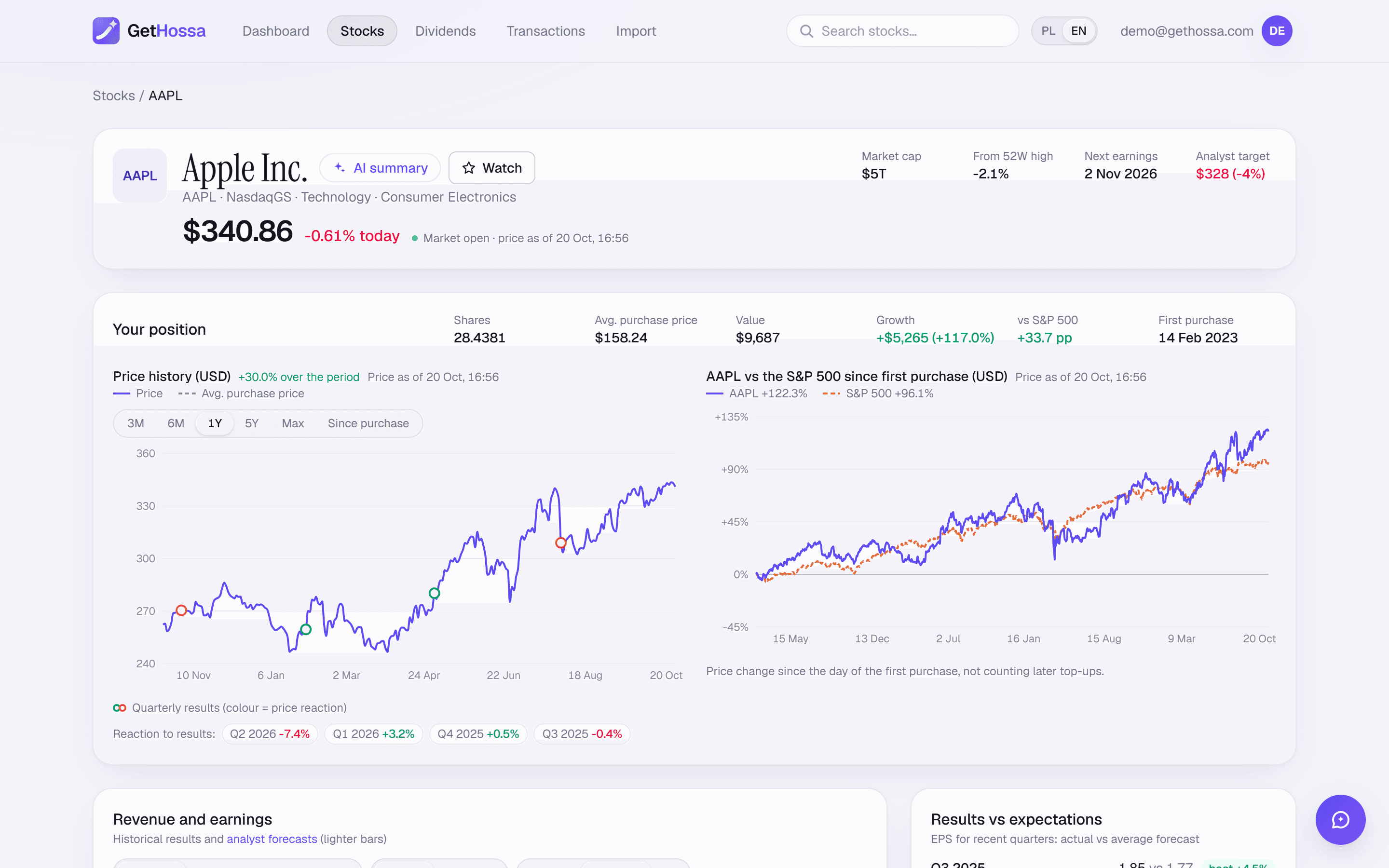
GetHossa company page for Apple (AAPL): price header with market cap, distance from the 52-week high and next earnings date, a revenue and profit bar chart with analyst forecasts, EPS results versus estimates, and a P/E history chart with its median and typical range.

Company research

Company research

Years of 10-K results, P/E against its own history, analyst targets and how the stock reacts to earnings.

  • Years of 10-K results. Revenue, net income, EPS and free cash flow, often 15 years or more back, with analyst forecasts as lighter bars.
  • Cheap or expensive vs itself. Monthly P/E and P/B history with the median and typical range, so today's multiple has context.
  • Earnings reactions. Each results release is marked on the price chart with the next session's move and the EPS surprise.
See how it works
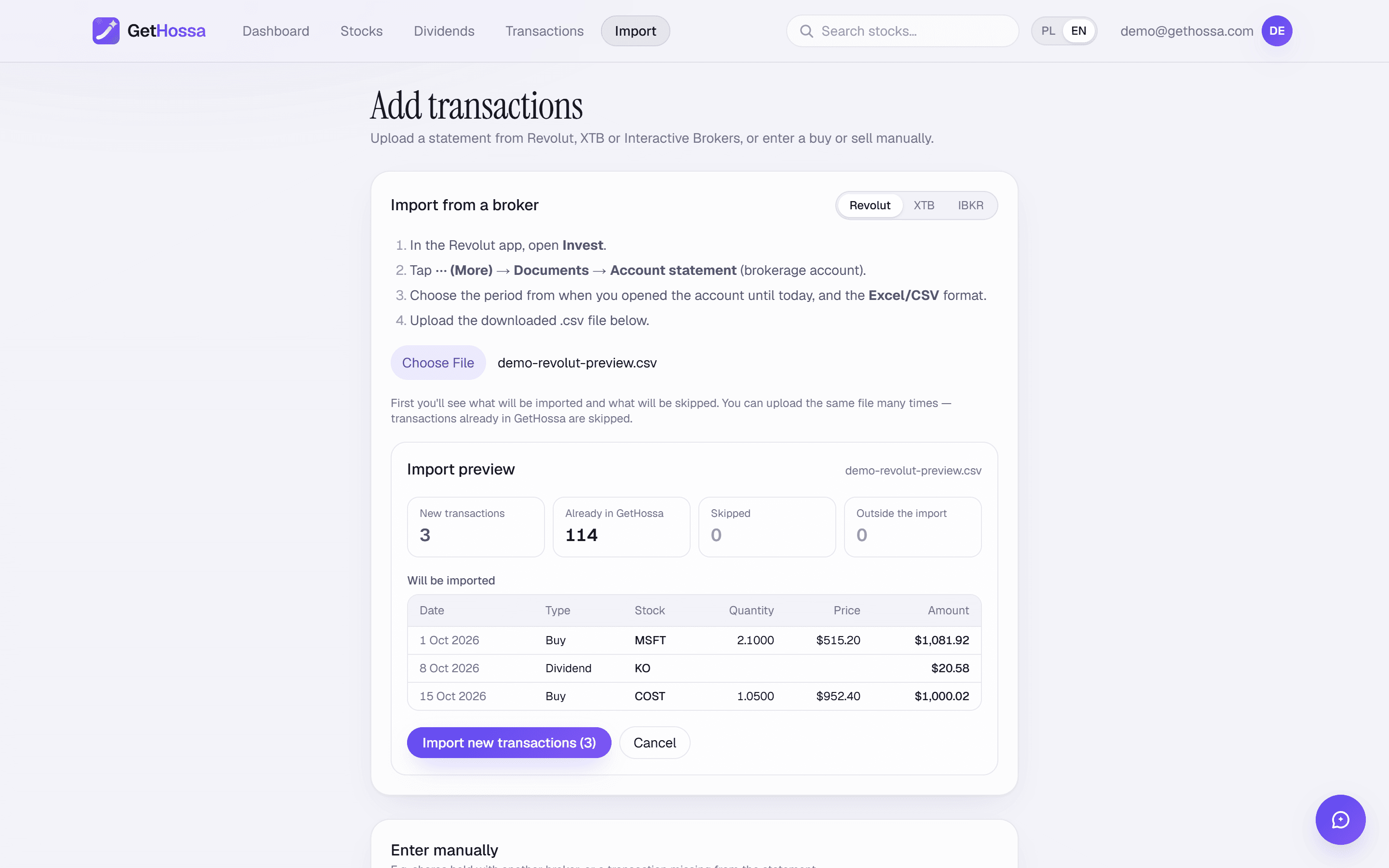
GetHossa import page: a broker selector with Revolut, XTB and IBKR, step-by-step instructions for exporting an Interactive Brokers Activity Statement as CSV, a file upload button, and below it a form for entering a purchase, sale or dividend by hand.

Import

Broker import

Upload an IBKR statement or type trades in by hand. No brokerage login, a preview before anything is saved.

  • No brokerage credentials. You upload a file you downloaded yourself. GetHossa never connects to your account and can't place orders.
  • Preview before saving. See new trades, ones already in GetHossa, rows that can't be read and why, and items outside the import's scope.
  • Any brokerage by hand. Date, shares, price and an optional fee, checked against that day's trading range so typos stand out.
See how it works
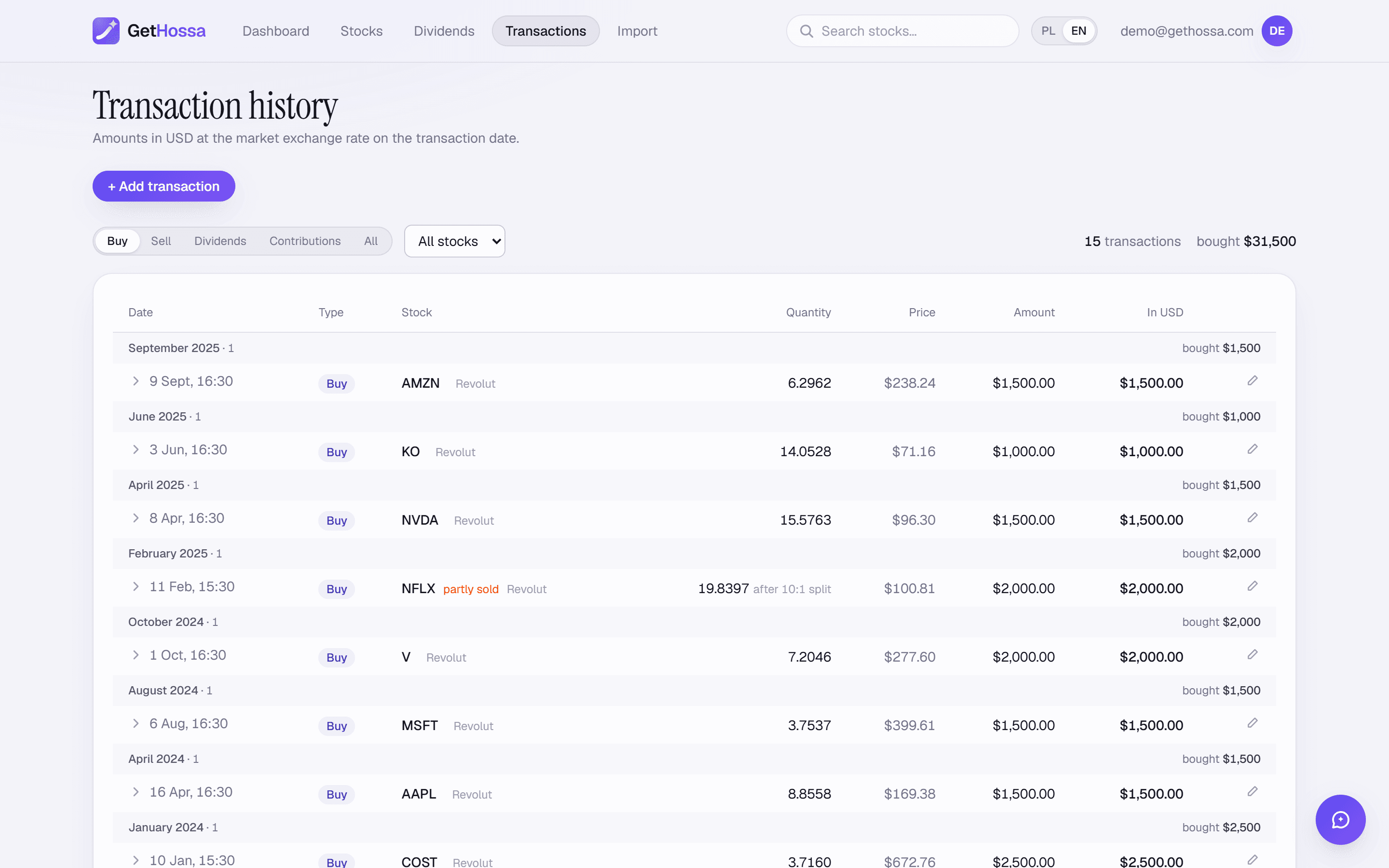
GetHossa transactions page on the Sales tab for a demo portfolio: summary tiles for closed trades, total realized result, winning trades, sale proceeds and lead over the S&P 500, above a list of closed positions with their FIFO purchase cost, sale price, holding period and a bar comparing each sale with the S&P 500.

Transactions

Transactions & realized gains

Every sale matched to its purchases FIFO, with the gain, holding period and a comparison with the S&P 500.

  • FIFO matching. Each sale uses up the oldest shares first, the IRS default when you don't identify specific lots.
  • Each sale vs the S&P 500. The cost of the matched lots “buys” SPY on the purchase dates and “sells” it on the sale date.
  • Fix and filter. Filter by company, correct a quantity, price or fee, and see which lots are still open.
See how it works

Also included

Your whole portfolio in dollars

Every holding, dividend and result in USD — international stocks included, converted at the market rate on each trade date. Prefer another currency? Switch to EUR or PLN with one click.

Today, yesterday and after hours

Live change for the current day, yesterday's result, plus pre-market, after-hours and overnight prices for US stocks.

How it works

Three steps to your first result

  1. 1

    Export your history

    Download an Activity Statement from Interactive Brokers (or an export from Revolut or XTB). Step-by-step instructions are in the app.

  2. 2

    Import it or add trades by hand

    Check the preview, then import. Trades from Schwab, Fidelity, Robinhood or any other brokerage can be added by hand.

  3. 3

    See if you're beating the market

    The dashboard shows value, return, TWR and your lead over the S&P 500. Prices refresh every 5 minutes.

Transparent methodology

Numbers you can check

We don't hide how we calculate. Every figure has a documented source and formula, so you can verify it in a spreadsheet.

Time-weighted return
Daily returns chained together — independent of when and how much you contributed.
S&P 500 with dividends
The index uses SPY's adjusted close, so reinvested dividends are included.
International stocks in dollars
Foreign holdings converted to USD at the market rate on each trade date, and at today's rate for their current value.
Reliable data sources
Prices from Yahoo Finance, financial statements from SEC EDGAR.
Read the methodology

Privacy

Your data stays yours

  • We never ask for your brokerage login — you upload a file you download yourself.
  • Passwords are hashed (scrypt) and your session lives in a secure cookie.
  • No ads, no selling data, no tracking cookies.
  • On request we delete your account together with all your data.
Privacy policy

Frequently asked questions

Is GetHossa free?+

Yes. GetHossa is free during the beta — just create an account.

Do I need to give you my brokerage login?+

No. You upload a transaction history file that you download from your brokerage yourself. GetHossa never connects to your account and can't place orders.

Which brokerages do you support?+

Interactive Brokers (Activity Statement CSV), Revolut and XTB can be imported directly. For Schwab, Fidelity, Robinhood, Vanguard and others, add your trades by hand for now — date, quantity and price — and your dividends with their date and amount.

Where do prices come from and how often are they updated?+

Prices come from Yahoo Finance every 5 minutes; exchanges themselves usually publish them with about a 15-minute delay. Financials of US companies come from 10-K filings on SEC EDGAR.

How do you compare my portfolio with the S&P 500?+

For every purchase you make, we “buy” the S&P 500 (SPY with dividends) on the same day for the same dollar amount. We also calculate the time-weighted return for both your portfolio and the index.

Can I track my portfolio in dollars?+

Yes. New English-language accounts use US dollars, and you can switch to EUR or PLN in the account menu at any time — value, return, dividends and the S&P 500 comparison are recalculated instantly.

Will GetHossa do my taxes?+

No. It shows closed positions matched first-in, first-out and the dividends you received, which helps you review your year, but your brokerage's 1099 forms are what you file from. This isn't tax advice.

Does GetHossa have an AI assistant?+

Yes. Once you sign in, an AI assistant built on Anthropic's Claude Haiku 5.5 is waiting in the corner of the screen. It answers questions about your portfolio and companies using your GetHossa data and the latest news, and suggests ideas for further research. It isn't an investment adviser and it can make mistakes.

Can I use GetHossa on my phone?+

Yes. Add GetHossa to your iPhone or Android home screen and use it like an app.

News

News for investors

All news

Blog

Guides for US investors

All articles

Tools

Calculators for investors

All calculators

Find out if you're beating the market

Import your history and see your portfolio next to the S&P 500 — in dollars, with dividends.

Create account